
Buyer’s guide

Best Heat Press Machine: Top Picks for Shirts, Sublimation & DTF

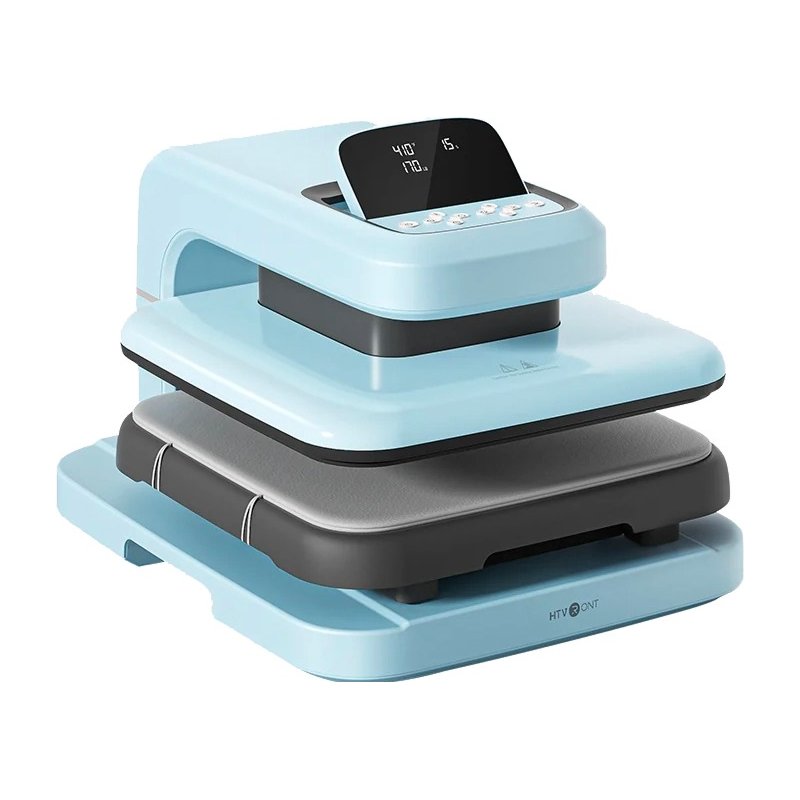
For most people pressing shirts at home, start with a 15×15 press with adjustable pressure and enough heat for sublimation. Our best overall pick is the HTVRONT Auto Heat Press 2, which presses and opens on its own. On a tighter budget, a manual 15×15 clamshell or a handheld 12×10 does the job.

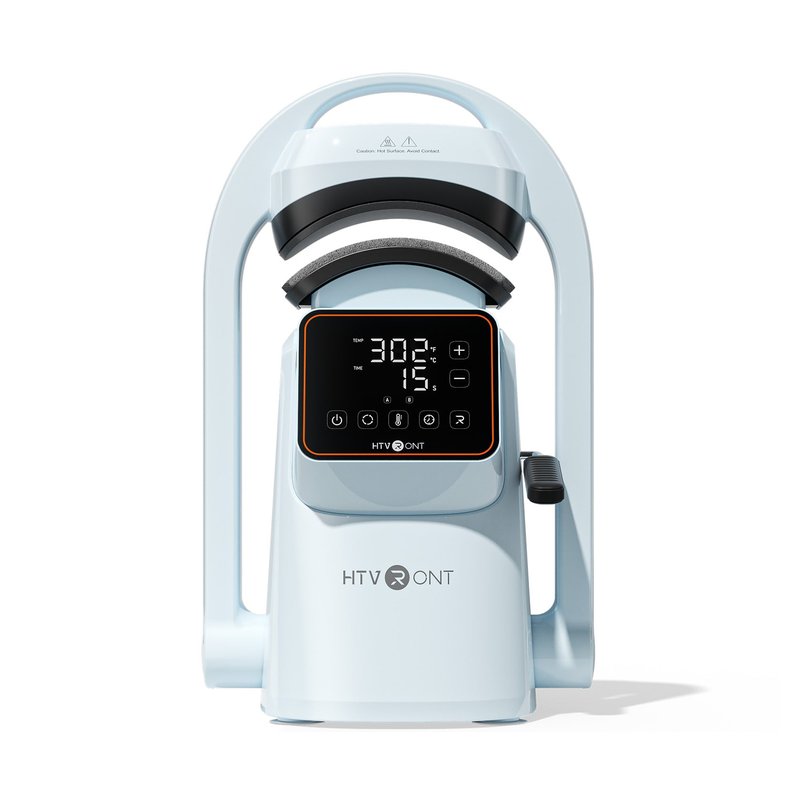
HTVRONT Auto Heat Press 2 heat press
Our #1 pick

HTVRONT Auto Heat Press 2

Premium price range

Platen15 x 15 in
Press typeAutomatic press & auto-release, slide-out drawer
Max temp (brand)410°F

See ratings & reviews ↗ · All 7 picks

Top picks at a glance

The best heat press machines, by what you make

Seven presses that cover what most people actually make: shirts, sublimation, DTF, hats and mugs. Each card says who should skip it.

Best overall#1
HTVRONT Auto Heat Press 2 heat press

HTVRONT Auto Heat Press 2

Premium price range

A 15×15 that presses and opens itself, with adjustable pressure, a slide-out drawer and 410°F for sublimation.

See options ›
Best manual 15×15#2
RoyalPress 15x15 Color LED heat press

RoyalPress 15×15 Color LED

Mid-range price range

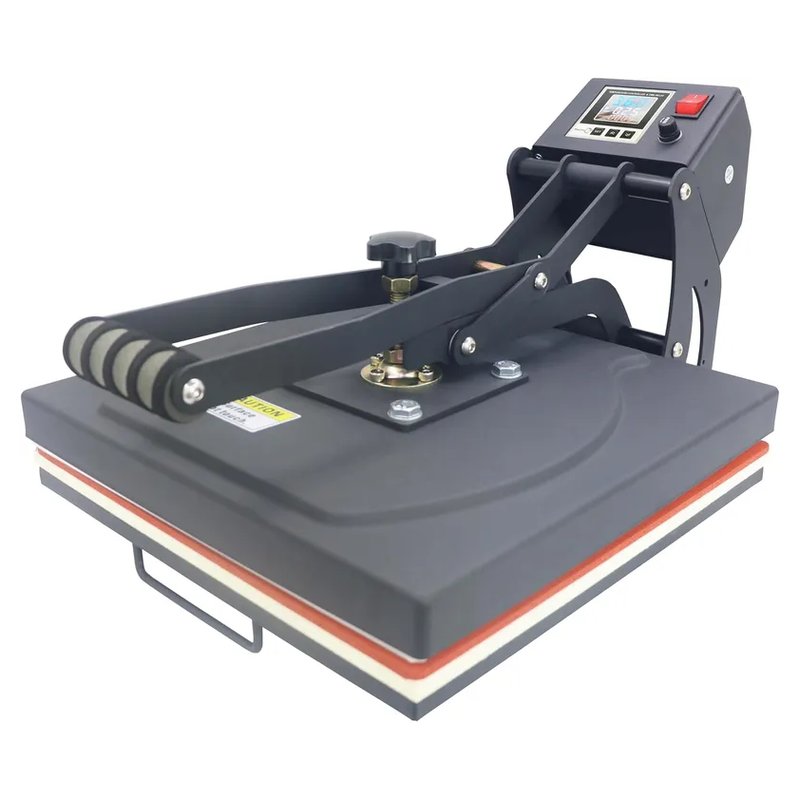
The classic lever clamshell for shirts and hoodies: 15×15 platen, pressure knob and a brand-listed 480°F.

See options ›
Best for beginners#3
Cricut EasyPress SE 12x10 heat press

Cricut EasyPress SE 12×10

Budget price range

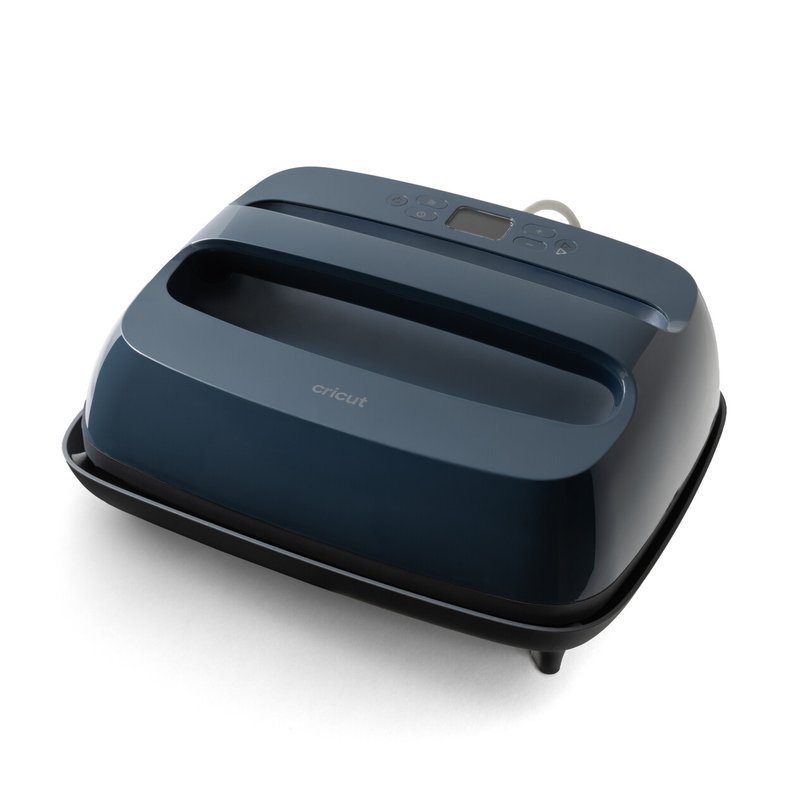
A handheld 12×10 that reaches 400°F, shuts itself off and fits in a cupboard between projects.

See options ›
Best 16×20 for DTF#4
VEVOR 16x20 Clamshell (1700W) heat press

VEVOR 16×20 Clamshell (1700W)

Mid-range price range

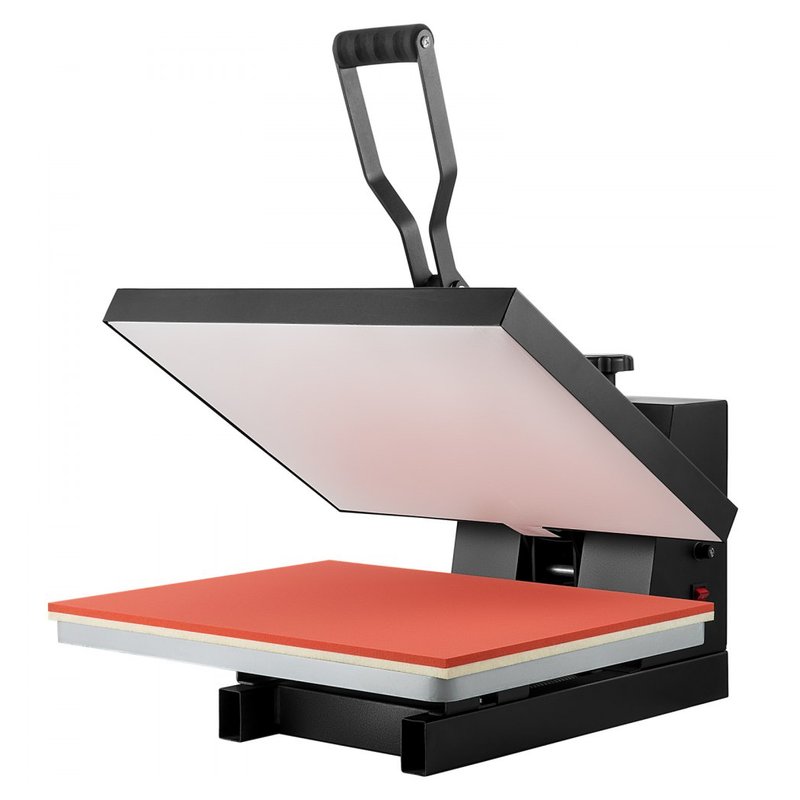
Oversize 16×20 platen for full-front prints and DTF gang-sheet jobs, at a Mid-range price.

See options ›
Best combo press#5
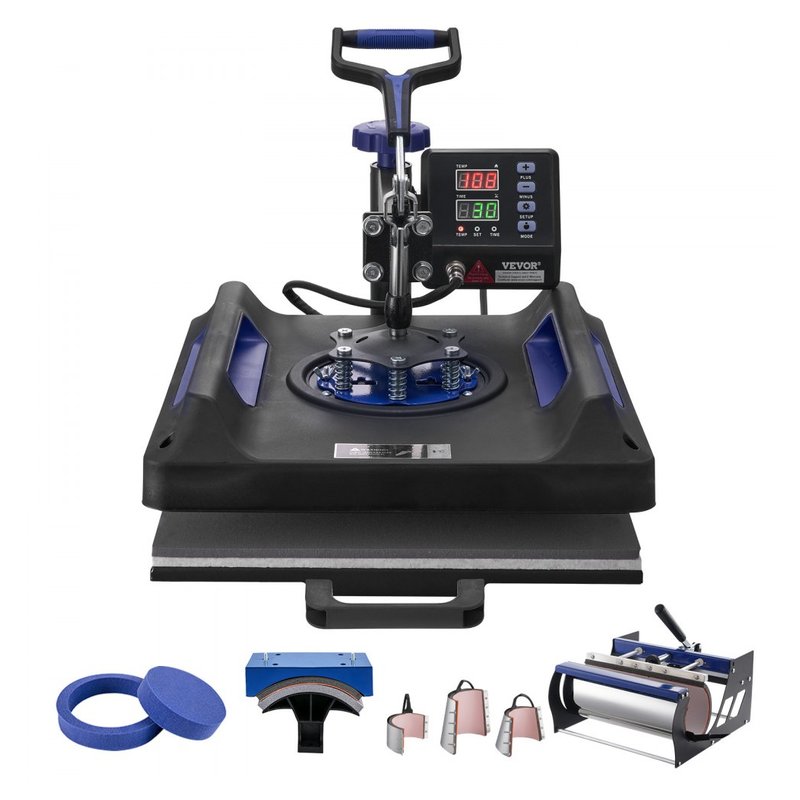
VEVOR 8-in-1 Swing-Away heat press

VEVOR 8-in-1 Swing-Away

Mid-range price range

A swing-away 15×15 with hat, mug and plate attachments, for trying several product types from one base.

See options ›
Best for hats#6
HTVRONT A300 Auto Hat Press heat press

HTVRONT A300 Auto Hat Press

Mid-range price range

Automatic cap press with two curved platens, presets and a 410°F ceiling.

See options ›
Best for mugs#7
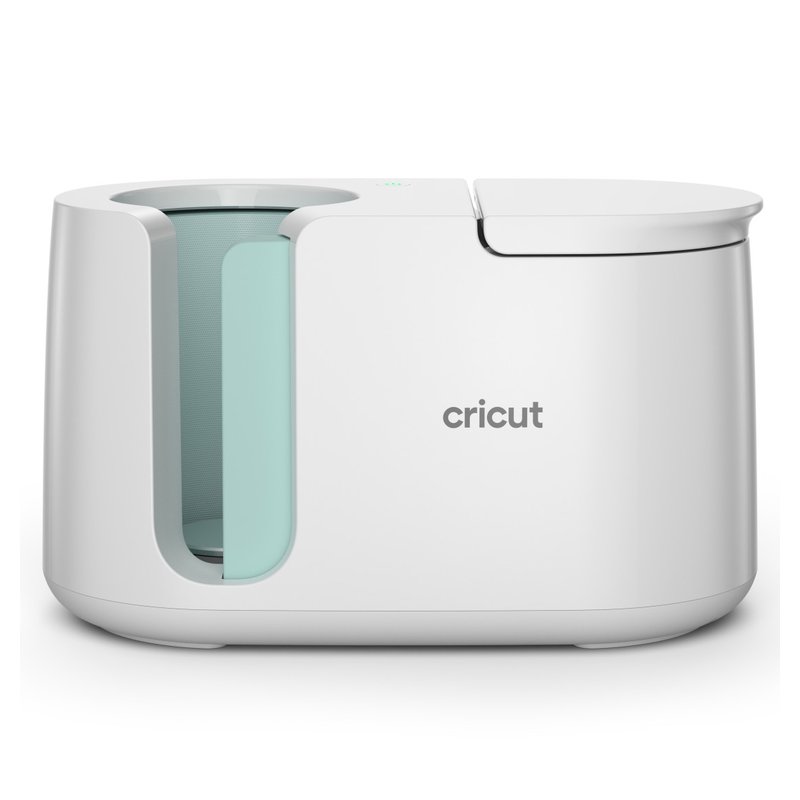
Cricut Mug Press heat press

Cricut Mug Press

Budget price range

One-button mug press for straight mugs of about 10–16 oz (Cricut’s pages differ): no dials to set.

See options ›

Prices change often, so we show a price range instead of a number. Budget is under $150, Mid-range $150–$300, Premium over $300, based on typical list prices.

Find your match

Start from what you want to make

The right press depends far more on the job than on the brand. Pick the line that sounds like you.

RoyalPress 15x15 Color LED heat press

I mostly make t-shirts and hoodies

Start with

RoyalPress 15×15 Color LED

A 15×15 platen covers most adult front prints. Choose a lever clamshell to save money or an auto-open press to save effort.

HTVRONT Auto Heat Press 2 heat press

I want to start sublimation

Start with

HTVRONT Auto Heat Press 2

Sublimation needs about 385–400°F, even pressure and polyester or coated blanks. Pick a press that reaches at least 400°F and check it with test strips.

Cricut EasyPress SE 12x10 heat press

I am brand new to this

Start with

Cricut EasyPress SE 12×10

A handheld 12×10 is the low-risk start for iron-on and Infusible Ink. Move to a tabletop press when you start batching.

VEVOR 16x20 Clamshell (1700W) heat press

I press DTF transfers

Start with

VEVOR 16×20 Clamshell (1700W)

DTF wants even pressure at the level your supplier lists (usually medium to firm) and accurate heat. A 16×20 platen fits gang-sheet cut-outs and oversize prints.

HTVRONT A300 Auto Hat Press heat press

Hats are my thing

Start with

HTVRONT A300 Auto Hat Press

Caps need a curved platen and gentle, even pressure over seams. A dedicated hat press beats a flat press with a bolt-on.

Cricut Mug Press heat press

Mugs and tumblers

Start with

Cricut Mug Press

A mug press wraps heat around the blank. Check the mug size it fits and whether it takes 20–30 oz tumblers.

Our picks in detail

What each press does well, and who should skip it

Specifications are each brand’s own. We have not tested or used these presses ourselves; fit notes draw on manuals, trade sources and published reviews. How we pick.

Best overall#1

HTVRONT Auto Heat Press 2

A 15×15 press that closes and opens itself. You set time, temperature and pressure, push the platen in, and the machine presses and releases on its own, so you are not muscling a lever or hovering over the timer. It is HTVRONT’s current flagship and the simplest route to tabletop-press results without tabletop-press effort.

Why it stands out

  • Automatic press and auto-release: HTVRONT says the platen lifts when the timer ends, and auto-open is what keeps a forgotten shirt from scorching (Lawson).
  • Adjustable pressure (HTVRONT lists 20–80 kg) and a slide-out drawer so you lay out the garment away from the hot upper plate.
  • Reaches 410°F, enough headroom for sublimation, which Sawgrass and Heat Press Nation run at about 385–400°F.
Platen15 x 15 in
Press typeAutomatic press & auto-release, slide-out drawer
Max temp (brand)410°F
Power1500 W, 120 V
Made forShirts, sublimation, DTF and HTV at home

Good fit if

  • You want a 15×15 for shirts, sublimation and DTF and would rather not clamp a manual lever.
  • You press at home and sometimes walk away from the table mid-press.
  • You want pressure you can set and repeat, not guess.

Skip it if

  • Space and weight matter: HTVRONT’s manual lists 43.2 lb (one listing says 48 lb).
  • You mainly press thick items: HTVRONT gives a maximum object height of 4.5 cm.
  • You need a long warranty: HTVRONT lists 12 months (extendable), well short of the 5 years STAHLS’ calls industry standard.

HTVRONT still sells the first-generation Auto Heat Press at a Mid-range price. It has the same 15×15 plate, 410°F and auto-release, without the newer model’s adjustable-pressure range.

Best manual 15×15#2

RoyalPress 15×15 Color LED

The classic manual 15×15 clamshell, done simply: a lever, a pressure knob, a color LED controller and a 480°F ceiling. It is the kind of press most t-shirt tutorials assume you own, at a Mid-range price.

Why it stands out

  • 15×15 platen, the size Heat Press Nation says has room for most t-shirt transfers.
  • Color LED controller with time, temperature and a piece counter that remembers settings (RoyalPress listing).
  • Brand-listed 1400 W on a standard 110 V plug and up to 480°F.
Platen15 x 15 in
Press typeManual clamshell, pressure knob
Max temp (brand)480°F
Power1400 W, 110 V
Made forT-shirts and flat sublimation blanks

Good fit if

  • You press shirts, hoodies and flat sublimation blanks and are happy to pull a lever.
  • You want a full-size press without paying for auto-open.
  • Your work surface can take a 48 lb machine (listing spec).

Skip it if

  • You often press thick items: clamshells close at an angle and can pinch the far edge (GRAPHICS PRO).
  • You want a long, clearly stated warranty: RoyalPress lists a limited warranty without a duration.
  • You do not want to work with your hands under a hot upper plate; a drawer or swing-away press keeps them further away.
Best for beginners#3

Cricut EasyPress SE 12×10

Cricut’s current handheld press for the home crafter: a 12×10 ceramic-coated plate, up to 400°F, simple digital controls and an auto-off. It replaced the EasyPress 3 on cricut.com and drops the Bluetooth app, which also means no phone activation.

Why it stands out

  • 12×10 plate covers most kids and adult chest designs in one or two presses.
  • Reaches 400°F, which Cricut says Infusible Ink needs.
  • Shuts off after about 13 minutes of inactivity, per Cricut’s troubleshooting page.
Platen12 x 10 in
Press typeHandheld, pressed by hand
Max temp (brand)400°F
PowerNot published
Made forIron-on and Infusible Ink projects at home

Good fit if

  • You make a few shirts, totes or pillow covers a month and want something that stores in a cupboard.
  • You already cut iron-on with a Cricut machine.
  • You are deciding whether heat pressing is for you before buying a tabletop press.

Skip it if

  • You press batches: you supply the pressure by hand, so results depend on how hard and how evenly you push (Cricut).
  • You need room for oversize prints or DTF gang sheets.
  • You want app presets: that is the older EasyPress 3, which Cricut is phasing out.
Best 16×20 for DTF#4

VEVOR 16×20 Clamshell (1700W)

A big 16×20 manual clamshell at a Mid-range price. That extra platen is what oversize prints, 2XL-and-up shirts and DTF gang-sheet cut-outs ask for, and it sits in the Mid-range tier rather than Premium.

Why it stands out

  • 16×20 platen, the size Signwarehouse points to for full-front, 2XL-and-up and oversize designs.
  • Brand-listed 1700 W with a pressure knob and digital time and temperature.
  • Clamshell frame keeps the footprint smaller than a swing-away of the same size.
Platen16 x 20 in
Press typeManual clamshell, pressure knob
Max temp (brand)Listed as 482°F or 570°F
Power1700 W, 110 V
Made forOversize prints and DTF gang-sheet jobs

Good fit if

  • You print large designs or press DTF transfers ordered as gang sheets.
  • You want 16×20 without paying Premium prices.
  • You have a sturdy table and a circuit the press does not share with other heavy loads.

Skip it if

  • Weight and space: VEVOR lists about 60 lb for a closely related 16×20 model.
  • You need a clear spec sheet: VEVOR’s listings give the maximum as 482°F in one place and 570°F in another, and no warranty on the listing.
  • You want to batch all day: a manual clamshell means pulling the handle on every press.
Best combo press#5

VEVOR 8-in-1 Swing-Away

One base, many jobs: a 15×15 swing-away press plus hat, mug and plate attachments. If you want to try shirts, caps and mugs before buying a dedicated press for each, this is the low-commitment way in.

Why it stands out

  • 360° swing-away top moves the hot plate out of the way while you lay out the item.
  • Attachments for hats, mugs and plates in one box.
  • Digital time and temperature with an adjustable pressure knob.
Platen15 x 15 in + attachments
Press type360° swing-away combo
Max temp (brand)Listings vary (400–480°F)
PowerListings vary (800–1150 W)
Made forShirts plus hats, mugs and plates

Good fit if

  • You are exploring several product types and do not know yet which will sell or stick.
  • Storage space is limited and three separate presses will not fit.
  • You press one-offs and small runs, not batches.

Skip it if

  • You will batch one product: Signwarehouse says changing attachments takes time and reheating, which makes combos poor for batching.
  • You need exact specs: VEVOR listings for this set disagree on wattage (800 vs 1150 W) and maximum temperature.
  • You want to press thick items at the top of the swing-away’s range; check the listing’s clearance first.
Best for hats#6

HTVRONT A300 Auto Hat Press

A dedicated hat press that presses and lifts on its own. Two curved platens, a touch screen with presets and a 410°F ceiling make it the simplest way to put HTV, sublimation or DTF on caps without wrestling a flat press.

Why it stands out

  • Automatic press and release with HTVRONT-listed pressure of at least 80 kg.
  • Two curved platens (about 6.7×2.8 in and 5.9×3.2 in) for different crown shapes.
  • Two preset modes plus a memory mode on the touch screen.
Platen2 curved hat platens
Press typeAutomatic hat press
Max temp (brand)410°F
Power350 W, 120 V
Made forCaps and hats

Good fit if

  • Hats are a regular product for you, not a once-a-year job.
  • You want consistent pressure on caps without leaning on a handle.
  • You need a compact machine (HTVRONT lists 9.26 lb).

Skip it if

  • You only make an occasional hat: a handheld mini press can do small hat designs.
  • You press oversize trucker fronts: Impressions magazine notes truckers need a larger lower platen than structured caps.
  • You want a clearly stated auto-off: HTVRONT’s page does not list one for this model.
Best for mugs#7

Cricut Mug Press

A one-button mug press. You wrap the mug, slide it in and press the button; Cricut sets the heat and time for you. It is built for Infusible Ink and Cricut mug blanks, and Cricut says generic sublimation mugs in the right size will likely work.

Why it stands out

  • One-touch operation: no temperature dial or pressure knob to get wrong (Cricut).
  • Fits straight-walled mugs of 11–16 oz and 82–86 mm diameter, per Cricut’s product page.
  • Low power draw: Cricut lists 500 W in North America.
Platen11–16 oz mugs
Press typeOne-touch mug press
Max temp (brand)Preset (no manual dial)
Power500 W
Made forInfusible Ink and sublimation mugs

Good fit if

  • You want to make mugs as gifts or a small product line with minimal setup.
  • You already use Infusible Ink.
  • You prefer predictable presets to tuning settings yourself.

Skip it if

  • You want tumblers: the Mug Press only takes straight-walled mugs, not 20–30 oz tumblers.
  • You want to set your own temperature and time: there are no manual controls.
  • You are impatient: 9to5Toys timed about six minutes per mug.

Side by side

Compare the specs

Scroll sideways on a phone. Temperatures are the brand’s stated maximums.

Heat PressBest forPlatenPress typeMax temp (brand)Made forPrice range
HTVRONT Auto Heat Press 2Best overall15 x 15 inAutomatic press & auto-release, slide-out drawer410°FShirts, sublimation, DTF and HTV at homePremiumDetails ›
RoyalPress 15×15 Color LEDBest manual 15×1515 x 15 inManual clamshell, pressure knob480°FT-shirts and flat sublimation blanksMid-rangeDetails ›
Cricut EasyPress SE 12×10Best for beginners12 x 10 inHandheld, pressed by hand400°FIron-on and Infusible Ink projects at homeBudgetDetails ›
VEVOR 16×20 Clamshell (1700W)Best 16×20 for DTF16 x 20 inManual clamshell, pressure knobListed as 482°F or 570°FOversize prints and DTF gang-sheet jobsMid-rangeDetails ›
VEVOR 8-in-1 Swing-AwayBest combo press15 x 15 in + attachments360° swing-away comboListings vary (400–480°F)Shirts plus hats, mugs and platesMid-rangeDetails ›
HTVRONT A300 Auto Hat PressBest for hats2 curved hat platensAutomatic hat press410°FCaps and hatsMid-rangeDetails ›
Cricut Mug PressBest for mugs11–16 oz mugsOne-touch mug pressPreset (no manual dial)Infusible Ink and sublimation mugsBudgetDetails ›

Want to see more than our seven picks?

Browse more heat presses ›

Not sure which press to start with?

If you press shirts at home and want to try sublimation or DTF, a 15×15 with settable pressure and auto-open covers the most ground. The Auto Heat Press 2 reaches 410°F and lifts its own platen when the timer ends.

How to choose

Five things that matter more than the brand

Most disappointing presses are the wrong size, the wrong type for the job, or less accurate than their display suggests.

01

Platen size for your biggest job

Buy for the largest design you will press. Signwarehouse says a 15×15 covers most adult front prints and a 16×20 handles 2XL-and-up and oversize designs. A 12×10 handheld suits kids’ clothes, totes and chest logos.

02

Press type: clamshell, swing-away, drawer or auto

Clamshells are compact and quick. Swing-aways close straight down, which suits thick items. Drawers and swing-aways keep your hands further from the hot plate, and auto-open lifts the platen when the timer ends.

03

Even heat and accurate temperature

Sawgrass says a display can be 5–40°F off the real platen temperature, and STAHLS’ names cold spots as the leading cause of ruined garments. Look for brands that publish heating details, and check any press with temperature test strips.

04

Pressure you can set and repeat

Time, temperature and pressure all matter (Transfer Express). Handhelds rely on your arm. A pressure knob, gauge or automatic press gives repeatable results, which counts most for DTF and sublimation.

05

Power, space and support

A 15×15 press can draw around 14 A on 110–120 V, and manuals ask for a grounded circuit it does not share. Check weight, table space, warranty length and whether replacement parts are sold.

FAQ

Heat press questions, answered

Straight answers to what people ask before buying, drawn from manufacturers, manuals and trade sources.

Heat press basics5

What is a heat press machine used for?

A heat press bonds a transfer to an item using controlled time, temperature and pressure. Transfer Express names those three as the requirements for any heat transfer. People use presses for heat transfer vinyl on shirts and bags, sublimation on polyester and coated blanks, DTF transfers, and with attachments or dedicated presses, hats, mugs and tumblers.

Do I need a heat press, or will an iron do?

An iron works for small, occasional iron-on projects; Cricut and Siser both publish iron instructions. For anything regular, a press is the better tool. Transfer Express says an iron runs cooler at the edges and covers only about 3×10 inches, and STAHLS’ estimates about 90 seconds per shirt with an iron versus about 15 with a press.

What is the difference between a clamshell and a swing-away press?

A clamshell opens like a jaw on a hinge; it is compact and quick but closes at an angle, which can pinch thick items (GRAPHICS PRO). A swing-away lifts the plate straight up and swings it aside, giving more room to lay out and even pressure on thick items, but it needs more space and costs more.

Are auto-open heat presses worth it?

For many home users, yes. Lawson says auto-open lifts the heating element when the timer ends, which helps prevent scorched garments if you step away. Automatic presses such as the HTVRONT Auto Heat Press 2 also set pressure for you. The trade-off is price, weight and more electronics.

Is a Cricut EasyPress a real heat press?

Yes, it is a handheld heat press. Cricut says it pairs the convenience of an iron with even heat and precise temperature control. You supply the pressure, though, so results depend on how hard and evenly you push. Cricut positions its tabletop AutoPress 2 for larger projects and batch making.

Want the one press that covers most jobs? Our best overall pick is an automatic 15×15.See full specs
Size and type5

What size heat press do I need for t-shirts?

For adult shirts, 15×15 is the common choice. Heat Press Nation says it has room for most t-shirt transfers. STAHLS’ UK, using Bella+Canvas sizing, says full-chest prints on XS–XL need about 40×40 cm (15.7 in), so if you print large designs or 2XL and up, a 16×20 gives more margin.

Is a 12×10 heat press big enough?

For kids’ clothes, chest logos, totes and pillow covers, usually yes. Transfer Express puts a standard adult print at about 11×11 inches, so a 12×10 can need two presses for a full adult design. That is why handheld 12×10 presses suit hobbyists more than shirt businesses.

Do I need a 16×20 heat press?

Only if your designs need it. Signwarehouse says 16×20 handles full-front prints, 2XL-and-up and oversize designs, and warns that a bigger heated area needs more power. If you press DTF gang-sheet cut-outs or oversized prints, 16×20 is worth it; for standard shirts, 15×15 is enough.

Are combo 5-in-1 and 8-in-1 presses any good?

They are a cheap way to try shirts, hats and mugs from one machine. Signwarehouse says combos are poor for batching because each attachment change takes time and reheating, and Heat Press Nation notes mug elements on its 8-in-1 are consumables not covered by warranty. Fine for variety, slow for volume.

What heat press is best for thick items?

A swing-away. GRAPHICS PRO says swing-aways close vertically, avoid pinch points and take substrates up to about 1¾ in thick, while clamshells can pinch the far edge. Check each press’s stated clearance: Heat Press Nation rates its Signature 15×15 clamshell for items up to ½ in.

Pressing large designs or DTF gang sheets? See our 16×20 pick.Read buyer reviews
Temperature, time and pressure5

What temperature should a heat press be for vinyl?

It depends on the vinyl, so follow the maker’s sheet. Siser lists 305°F for 10–15 seconds at medium pressure for EasyWeed, while Siser Glitter runs at 320°F. Siser tells EasyPress users to add about 30°F, and Cricut sends users to its Heat Guide for its own iron-on.

What temperature for sublimation?

Usually about 385–400°F. Sawgrass’s chart gives polyester fabric 400°F for 45 seconds at medium pressure, Heat Press Nation says 385–400°F for 45–60 seconds, and BELLA+CANVAS cites 20–35 seconds. Mugs take far longer: Sawgrass lists 150–300 seconds. Treat these as starting points and test.

What settings do DTF transfers need?

Whatever your transfer supplier prints on the sheet, because settings vary. Stahls’ lists 325°F on cotton for 12–15 seconds with a hot peel; Transfer Superstars gives about 300°F on cotton; DTF Transfers Now drops to 280–295°F with a cold peel on polyester. Several suppliers recommend a short second press.

What do light, medium and firm pressure mean?

On a manual press, a GRAPHICS PRO article says light pressure closes easily with one hand, medium takes some effort with two, and firm is hard to close even with two hands. On air presses, it gives roughly 25–30 psi as light, 32–38 as medium and 40 or more as firm.

Is the temperature on my press display accurate?

Not always. Sawgrass says displayed and actual platen temperatures can differ by 5–40°F or more and drift with age. It recommends test strips at the center and four corners rather than an infrared thermometer, as does the Hotronix manual; Ninja Transfers treats IR readings as acceptable but slightly less accurate.

Want settings you can save and repeat? Our best overall pick stores time, temperature and pressure.What buyers say
HTV, sublimation and DTF5

Can you sublimate on cotton?

No. Epson says dye-sublimation works only on polyester fabrics or polyester-coated hard goods, and GRAPHICS PRO says the ink does not adhere to natural fibers. On blends the print can wash out of the cotton. Sources disagree on the minimum polyester: ColDesi says 100%, Cricut says at least 75% for Infusible Ink, BELLA+CANVAS says 50% or more.

Can you sublimate on dark shirts?

Not with normal sublimation. Epson explains that dye-sublimation has no white ink, which is why blanks are usually white or light-colored. For dark shirts, use heat transfer vinyl or DTF: Shopify notes DTF’s white ink base lets it print vivid colors on dark fabrics.

What do I need for sublimation?

A sublimation printer with sublimation ink, sublimation paper, polyester or coated blanks, and a press that reaches about 400°F. Heat Press Nation adds that once a printer is used for sublimation it cannot go back to regular printing. Heat-resistant tape and parchment or cover sheets are standard extras.

Do I need a DTF printer to use DTF transfers?

No. Castle Ink notes that suppliers print DTF transfers to order and ship them, often as gang sheets priced by the square foot. You only need a heat press. Epson’s first DTF printer launched at $13,995 MSRP, so buying printed transfers avoids that cost.

HTV, sublimation or DTF: which lasts longest?

Each maker makes its own claim. Lawson says a sublimated image will not crack, peel or wash away, though Epson advises against sublimation for long-term outdoor use. Cricut claims its Everyday Iron-On outlasts 50+ washes, and Stahls’ says its DTF transfers withstand 50 washes in lab testing. Care matters for all three: wait 24 hours, wash inside out in cold water and skip fabric softener.

Starting sublimation? Our pick reaches 410°F with pressure you can set.See details
Hats, mugs and tumblers5

Can you heat press a hat with a regular press?

You can with a hat attachment or a combo press, but a curved hat platen does the job better. Stahls’ says a curved platen matched to the hat shape, heat tape, removing the cardboard and pulling down the sweatband prevent sliding and creases. Seams are the usual trouble: test over a seam first.

What temperature for HTV on hats?

Check your vinyl’s sheet first. Printable Press gives 305–315°F for 15 seconds at medium pressure on structured cotton twill caps, and 270–285°F on polyester caps to avoid dye migration. It also notes that medium on a cap press is roughly heavy on a flat press.

What mugs fit the Cricut Mug Press?

Straight-walled mugs of about 3.2–3.4 in (82–86 mm) diameter. Cricut’s product page says 11–16 oz while its help article says 10–16 oz and a maximum height of 4.72 in. It is designed for Cricut blanks and Infusible Ink; generic sublimation mugs in that size will likely work but are not guaranteed.

Mug press or tumbler press?

Match the press to the blank. Cricut’s Mug Press takes straight mugs only. HTVRONT’s Auto Tumbler Press takes 10–30 oz straight tumblers and mugs, and combo presses add mug and tumbler elements. Heat Press Nation notes tumblers expand with heat, so it suggests lower pressure or preheating.

How long does it take to sublimate a mug?

Minutes, not seconds. Sawgrass lists ceramic mugs at 350–400°F for 150–300 seconds, and a Geo Knight executive writing in GRAPHICS PRO suggests starting around 400°F for four and a half minutes. 9to5Toys timed the Cricut Mug Press at about six minutes per mug.

Making mugs? Our pick is a one-button press with nothing to dial in.Read owner reviews
Power and safety5

How much electricity does a heat press use?

A 15×15 press draws a lot while heating. Heat Press Nation lists its Signature 15×15 at 1500 W and 14 A on 110 V, and 16×20 presses run about 1750–1800 W. Smaller tools draw far less: Cricut lists 500 W for the Mug Press and HTVRONT lists 350 W for its A300 hat press.

Can I plug a heat press into an extension cord?

Manuals discourage it. The Hotronix and Siser manuals ask for a dedicated grounded circuit, and say any cord must be as short as possible, at least 12 gauge and rated for 20 amps. ESFI calls extension cords a temporary fix. Ninja Transfers says to avoid cords or power strips not rated for the press.

Do I need a dedicated circuit?

It depends on the model, so read your manual. Hotronix says a 120 V press needs a full 15 A grounded circuit not shared with other heavy equipment, including a second press. Siser’s Digital Clam manual says a full 10 A circuit. Either way, keep other high-demand appliances off that circuit while you press.

Do heat presses give off fumes?

Some materials do. Cricut says to use its Mug Press in a well-ventilated area and that the odor fades with use. GRAPHICS PRO says a little airflow is recommended for sublimation, with neoprene-backed items like mousepads the worst, and Ninja Transfers advises ventilation when pressing DTF. For sublimation, GRAPHICS PRO says a small desk fan is usually enough outside high-production shops; for DTF in enclosed spaces, Ninja Transfers recommends an exhaust fan.

How do I use a heat press safely?

Keep children and pets away, never leave it plugged in unattended, and keep hands clear when it locks down, as the Hotronix manual says. VEVOR’s manual adds insulated gloves and a flat, stable, flame-retardant surface. Cricut warns against silicone baking mats or foil under an EasyPress because both get dangerously hot.

Want your hands further from the hot plate? Our best overall pick has a slide-out drawer and opens itself.See details
Results and durability5

Why is my vinyl peeling after pressing?

Usually too little temperature, pressure or time. Sign Warehouse says lifting HTV usually means one of those, and Atlanta Vinyl adds skipping the pre-press, since moisture in the fabric blocks the bond. Moisture-repellent fabric coatings can also block adhesion. Re-cover and re-press lifted areas for a few seconds if the vinyl allows.

How long do heat-pressed shirts last?

With good settings and care, a long time. Cricut claims its Everyday Iron-On outlasts 50+ washes and Stahls’ lab-tests its DTF to 50 washes. Shopify notes heat transfers sit on the fabric and can crack at the edges over time, unlike screen print that soaks in. Layered vinyl generally lasts less than a single layer.

Should I pre-press the shirt?

Yes. Siser specifies a 2–3 second pre-press for EasyWeed, and ASI says wrinkles and moisture prevent an even bond. Atlanta Vinyl suggests 5–10 seconds. A quick press flattens the area and drives out moisture before the transfer goes on.

Do I need a Teflon sheet or parchment?

Use a cover sheet unless your transfer says otherwise. Siser calls for a heat transfer cover sheet or multipurpose paper over EasyWeed, and Heat Press Nation uses parchment for sublimation. Stahls’ says its DTF transfers need no cover sheet, and some suppliers recommend parchment for a second press.

How do I wash heat-pressed clothes?

Wait 24 hours, turn the garment inside out and wash cold with mild detergent. Siser, Cricut and DTF Transfers Now all say to skip fabric softener, and Cricut says not to bleach or dry clean. Siser allows normal drying for EasyWeed; DTF suppliers suggest low heat or hang drying.

Ready to compare more presses side by side?Browse more heat presses

How we pick

How this guide is put together

  • We compare each brand’s published specs: platen size, press type, maximum temperature, power and pressure control.
  • We read manuals and trade sources (Siser, Sawgrass, STAHLS’, Heat Press Nation, GRAPHICS PRO) and named reviews.
  • We note where sources disagree, such as listings that give two different maximum temperatures.
  • We do not lab-test, accept free products or take payment for placement.

What a heat press can and cannot do

A press gives you controlled heat, time and pressure. The transfer still sets the rules: follow the settings that came with your vinyl, paper or film, and check your press with temperature strips if results are inconsistent.

Read how we pick →

Match the press to the job, then dial in the settings

Pick the platen size for your largest design and the press type for how often you press. If you are unsure, start with our best overall pick and the settings sheet that came with your transfers.